
learning tools
momence guides
Where can teachers see their active requests?
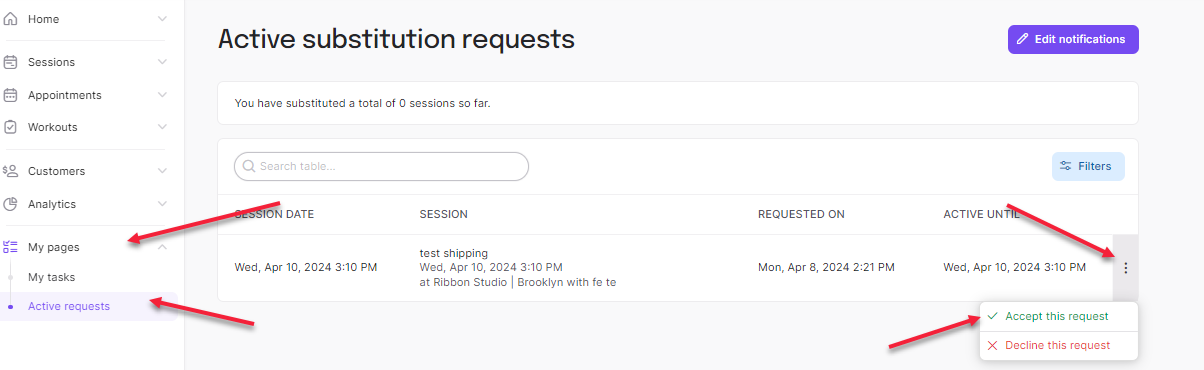
Under My Pages you can find Active Requests. Each unaccepted request will be listed here and can be accepted by clicking the dropdown menu to the right.
There will also be a notification given so that you’re able to see the request via your e-mail when there is a sub request needed.
-
At our community-focused yoga, pilates, and wellness studio, we are committed to nurturing a thriving and inclusive environment where individuals of all backgrounds can find harmony, strength, and well-being. Our mission is to empower our community through these core values:
-
At Union 108, we envision a vibrant and inclusive space where individuals of all backgrounds come together to cultivate holistic well-being. As a proudly black-owned space, our studio is a sanctuary that celebrates differences, heritage stories and belonging amplifying the value of collective work, We aspire to be a space of empowerment, fostering a community where self-discovery, healing, and joy flourish.
-
Togetherness
Fostering unity within the community, encouraging individuals to connect and support one another on their wellness journeys. Striving to create an ethical space where everyone feels welcomed, respected, and included.
Trust and amplify
By the standards of the rest of the world, we over trust. We’re okay with that.
Collective Work and Responsibility
The responsibility is shared of improving the overall health and vitality of our community. It is shared in growth and success of the space. Growth of the space through collective work and responsibility ensures that everyone wins and grows. Collaboration, compassionate accountability, and the collective effort to uplift each other are needed.
Innovation
Celebrating creativity as an essential element of well-being. Through innovative classes, workshops, and events, we inspire our community to explore their creative potential and express themselves authentically. This takes effort, with all providers loving their craft, being aware of diversity, equity and inclusion.
Autonomy
Empower individuals to take control of their well-being and teaching career by providing the tools and guidance needed to make informed choices. Self-discovery, self-learning and self-empowerment are encouraged.
Optimism
We are micro pessimists but macro optimists.
Sustainability
Support local & community connected businesses and artisans, fostering a thriving local ecosystem while providing affordable wellness options for our community. This is also in recognizing privilege and decolonizing wellness spaces by putting our focus on marginalized communities especially visible based on the history of wellness spaces.
Purpose
To help individuals find their own paths to wellness and personal growth, to create community and collective awareness. Offering a diverse range of classes and programs designed to align with our students' unique goals and aspirations. Those diverse offerings are also provided by diverse teachers, guides and experts.
Faith
There is faith in the resilience and potential of our community. We provide support, encouragement, and belief in our students' ability to achieve their wellness goals and live their best lives within our capacity and values.
-
Event Policy Changes:
New Event Request Form:
Moving forward, all teachers and facilitators can request to host events via our new Online Event Request Form. This system will ensure that all event details are centralized and organized. Once your request is submitted, we will review it and respond within 2-3 days with date availability or ask some questions on how we can support you.
We are currently booking events for November 2024 through July 2025.New Per Hour Rate Structure:
Effective today, we are moving away from the 60/40 revenue split for events and will implement a per hour rate based on the offering and minimum participant requirements. Once we receive your event proposal, we will provide a rate and participant threshold, allowing you to decide whether to proceed. After confirmation, you’ll receive an event agreement and checklist to help prepare and so we can make sure all the information is sent out to members, guests and community.
This shift will streamline event planning, foster collaboration, and encourage accountability, ensuring a smooth and productive process for all involved.Community Events Distribution:
Based on feedback from the community, we’ll be rotating the hosting of our staple community events, such as those with Saje, The Men’s Shed, Arnprior Hospital, Local Businesses, Arnprior Animal Rescue, Town of Arnprior and Somewhere Inn among our teaching staff. This will ensure that every teacher has an opportunity to participate and host these valuable community collaborations. We'll make sure to send out a form so that each teacher can let us know their areas of interest.Send all event invoices to unioninvoicing@gmail.com. Payroll is processed every Monday before 12pm
This will allow us to accurately add the event to the payroll in a timely manner.
Invoice Requirements:
When submitting your invoice, please ensure it includes the following details:
Your Name, E-mail, Address, Phone Number - If you have a business name please add that as well
Tax ID Number if you charge HST
Date of the Event:
Name of the Event:
Total Number of Registrants:
If there is a different price for members, please include this on a separate line.
Payment Due Date [Must be 14 days from date you’ve sent the invoice]